
Download Awaken – Free Mac Alarm Clock with iTunes Integration
Overview
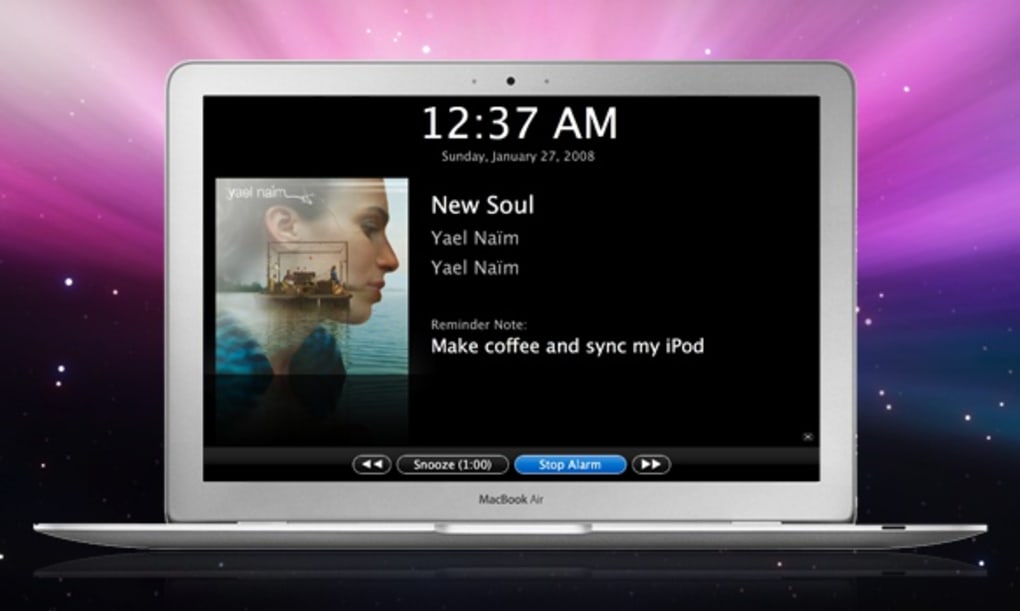
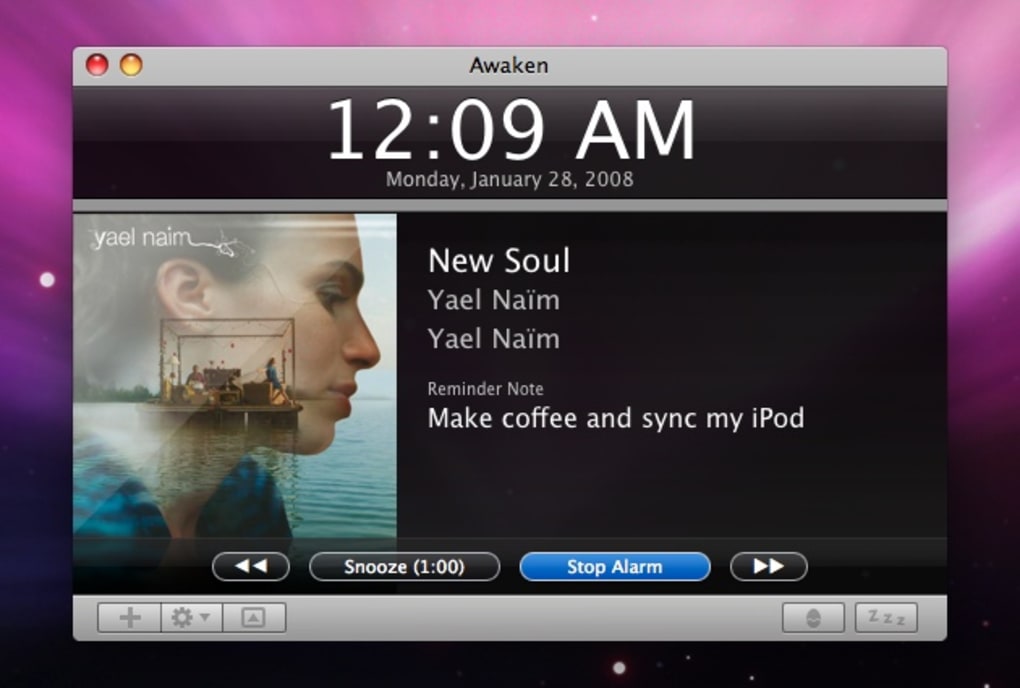
Awaken is a beautifully designed alarm clock for macOS that turns your morning routine into a musical experience. Built around a sleek, modern interface, the app lets you schedule multiple alarms and tie each one to any song, playlist, or podcast from your iTunes library. When the alarm fires, Awaken displays the album art, song title, and artist information, creating a visual cue that helps you wake up with a smile.
While the program doesn’t support media stored on external drives, it covers the vast majority of iTunes users who keep their music locally. Beyond basic alarms, Awaken includes a snooze function, a backup alarm in case the first one fails, and a versatile egg timer for short tasks or breaks. The app also integrates with the Apple Remote, allowing you to control alarms from across the room without touching the keyboard.
Regular updates are essential—if a new version is pending, existing alarms may not trigger, so keeping the software current is a best practice. Overall, Awaken offers a polished, reliable solution for anyone who wants a personalized wake‑up soundtrack on their Mac.
Key Features
- iTunes Library Integration: Choose any track, album, playlist, or podcast as your alarm sound.
- Dynamic Album Art Display: Visual album art appears on the alarm screen, reinforcing the music cue.
- Multiple Alarms: Set unlimited alarms with individual settings for each.
- Backup Alarm & Snooze: Automatic secondary alarm and customizable snooze intervals.
- Egg Timer & Countdown: Quick timers for short tasks, configurable to seconds.
- Apple Remote Support: Control alarms from a distance using the Apple Remote.
- Volume Per‑Alarm Control: Adjust the playback volume for each alarm independently.
- Output Device Selection: Direct alarm sound to a specific audio device (e.g., headphones, external speakers).
- Clean UI Redesign: Fresh, intuitive interface built from the ground up.
- Automatic Updates: Prompt notifications for new releases to ensure reliable performance.
Installation & Usage Instructions
Step‑by‑Step Installation
1. Download the installer: Visit the official Awaken website and click the “Download for macOS” button. The file will be a .dmg package.
2. Mount the DMG: Double‑click the downloaded file; macOS will mount it as a virtual drive.
3. Copy to Applications: Drag the Awaken icon into your Applications folder. This step ensures the app receives the proper permissions.
4. Open the App: Navigate to Applications, locate Awaken, and double‑click to launch. macOS may warn you about an app from an unidentified developer; click “Open” to proceed.
5. Grant Permissions: The first run will request access to your iTunes library and notification center. Accept both to enable full functionality.
Getting Started with Your First Alarm
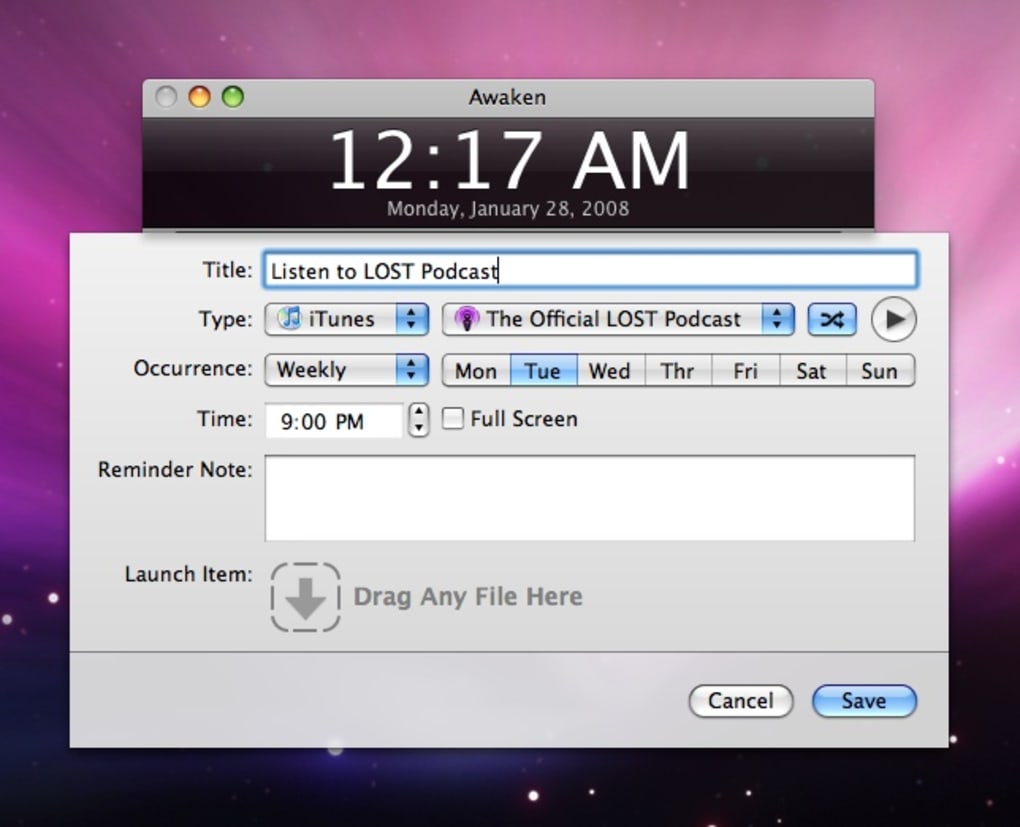
After installation, the main window presents a clean clock face with a “+” button in the top‑right corner. Click the button to create a new alarm. In the dialog that appears, you can:
- Set the time using the hour/minute sliders.
- Choose a repeat pattern (daily, weekdays, custom).
- Select a sound source: click “Choose Song” to browse your iTunes library, or pick a built‑in sound.
- Adjust the volume slider specific to this alarm.
- Enable “Backup Alarm” to schedule a secondary wake‑up 5 minutes later.
- Toggle snooze and set the snooze duration.
Once saved, the alarm appears in the list with a small album‑art thumbnail. When the alarm fires, Awaken takes over the screen, displays the artwork, and begins playback. Use the Apple Remote or the on‑screen controls to dismiss, snooze, or skip the track.
For quick timers, click the “Egg Timer” tab, set the desired duration, and start. The timer will count down and alert you with a gentle chime when finished, perfect for Pomodoro‑style work sessions.
Compatibility and System Requirements
Awaken is designed exclusively for macOS. The current version supports macOS 10.13 (High Sierra) and later, including macOS Ventura and macOS Sonoma. It runs natively on both Intel‑based Macs and Apple Silicon (M1, M2, and later) without requiring Rosetta translation, delivering smooth performance even on older hardware.
The app relies on the local iTunes (or Music.app on newer macOS versions) library, so it works best when your media files are stored on the internal drive. External drives are not supported for alarm playback, although you can still use built‑in sounds in those cases. Minimum system specifications are modest: 2 GB RAM, 100 MB free disk space for the app itself, and an active internet connection for update checks.
No additional drivers are required, and the software respects macOS sandboxing, ensuring a secure environment for your data.
Pros and Cons
Pros
- Deep iTunes/Music integration for personalized wake‑up music.
- Visually appealing UI with real‑time album art.
- Multiple alarms, backup alarms, and customizable snooze.
- Egg timer for short tasks and Pomodoro‑style workflows.
- Apple Remote compatibility for hands‑free control.
- Per‑alarm volume and output device selection.
- Free to download with optional donation for support.
- Regular updates improve stability and add features.
Cons
- Cannot play songs stored on external hard drives.
- Alarms may fail to trigger if an update is pending.
- No native Android or iOS companion app.
- Limited to macOS; no Windows version available.
- Requires access to the iTunes/Music library, which may be restricted in corporate environments.
Frequently Asked Questions
Can I use Awaken with Apple Music streaming tracks?
Awaken accesses the local iTunes/Music library, so only tracks that are downloaded to your Mac can be used as alarm sounds. Streaming‑only songs will not be available for selection.
Is there a way to set a random song for each alarm?
Yes. When configuring an alarm, choose a playlist instead of a single track. Awaken will shuffle the playlist each time the alarm fires, giving you a fresh wake‑up experience.
How does the backup alarm work?
If the primary alarm does not stop after the set duration, Awaken automatically triggers a secondary alarm (by default 5 minutes later). You can customize the backup interval in the alarm settings.
Can I control Awaken with keyboard shortcuts?
Awaken includes a set of default shortcuts for snooze (Space), dismiss (Enter), and opening the timer (Cmd + T). These can be modified in the Preferences panel under the “Keyboard” tab.
Is my data safe when I grant access to my iTunes library?
Awaken follows macOS sandboxing rules and only reads metadata needed for alarm playback. No personal data is transmitted outside your machine, and the app does not contain advertising or telemetry.
Conclusion & Call to Action
Awaken delivers a polished, feature‑rich alarm experience that feels native to macOS. Its deep integration with the iTunes/Music library, combined with a modern UI and practical extras like an egg timer and Apple Remote support, makes it one of the most compelling free alarm clocks for Mac users. While the inability to play external‑drive songs and occasional update‑related hiccups are minor drawbacks, the overall reliability and customization options outweigh these concerns. If you’re looking to replace the default macOS alarm with something that wakes you up to your favorite tracks and shows you beautiful album art, Awaken is ready to download and install right now. Click the download button below, install Awaken, and start your mornings with music that inspires you.
Awaken offers a sleek, music‑driven wake‑up solution for Mac users. The iTunes integration and album‑art display are standout features, and the backup alarm ensures you won’t oversleep. Minor issues like pending updates blocking alarms are easy to manage with regular checks. Overall, a solid 4.5‑star rating.
- Pros: iTunes integration, beautiful UI, backup alarm, Apple Remote support.
- Cons: No external‑drive playback, update dependency.







